Grafana in KOF#
Note
Effective immediately, Mirantis will no longer distribute Grafana as part of its products or services. This change is being made to proactively avoid potential licensing, redistribution, or compliance considerations related to third-party software. For more information, please contact Mirantis, check the Using KOF without Grafana and Grafana in KOF guides.
Explore the Using KOF guide showing how to use KOF without Grafana.
Install and enable Grafana#
If you want to install Grafana manually and enable its support in KOF, apply the next steps:
- If you're using
kof-operatorschart version 1.5.0 or less, run:This is required becausekubectl apply --server-side --force-conflicts -f \ https://github.com/grafana/grafana-operator/releases/download/v5.18.0/crds.yamlhelm upgrade -idoes not install immutable CRDs when a dependency is enabled in an already installed chart. KOF 1.6.0 uses auto-upgradable CRDs. - Add to the
kof-values.yamlfile:kof-operators: values: grafana-operator: enabled: true kof-mothership: values: grafana: enabled: true -
Apply
kof-values.yamlto the Management Cluster:helm upgrade -i --reset-values \ --create-namespace -n kof kof \ oci://registry.mirantis.com/k0rdent-enterprise/charts/kof \ --version 1.4.1 \ -f global-components.yaml \ -f kof-values.yaml \ # --ca-file $CUSTOM_REGISTRY_CERT_PATH_IF_ANYPlease use helm v3 for now.
-
Install Grafana manually, for example:
kubectl apply -f - <<EOF apiVersion: grafana.integreatly.org/v1beta1 kind: Grafana metadata: name: grafana-vm namespace: kof labels: dashboards: grafana spec: version: 10.4.18-security-01 disableDefaultAdminSecret: true persistentVolumeClaim: spec: accessModes: - ReadWriteOnce resources: requests: storage: 200Mi # storageClassName: openebs-hostpath deployment: spec: template: spec: securityContext: fsGroup: 472 volumes: - name: grafana-data persistentVolumeClaim: claimName: grafana-vm-pvc containers: - name: grafana env: - name: GF_SECURITY_ADMIN_USER valueFrom: secretKeyRef: key: GF_SECURITY_ADMIN_USER name: grafana-admin-credentials - name: GF_SECURITY_ADMIN_PASSWORD valueFrom: secretKeyRef: key: GF_SECURITY_ADMIN_PASSWORD name: grafana-admin-credentials - name: GF_INSTALL_PLUGINS value: "victoriametrics-logs-datasource 0.21.0,victoriametrics-metrics-datasource 0.19.4" EOF - You may optionally add features like
dexandingressfrom this example. - Wait for Grafana installation to complete successfully:
kubectl wait grafana -n kof grafana-vm \ --for='jsonpath={.status.stage}=complete' \ --for='jsonpath={.status.stageStatus}=success' \ --timeout=5m - Get access to Grafana:
kubectl get secret -n kof grafana-admin-credentials -o yaml | yq '{ "user": .data.GF_SECURITY_ADMIN_USER | @base64d, "pass": .data.GF_SECURITY_ADMIN_PASSWORD | @base64d }' kubectl port-forward -n kof svc/grafana-vm-service 3000:3000 - Login to http://127.0.0.1:3000/dashboards with the username/password printed above.
- Check the Dashboards - Cluster Monitoring - Kubernetes / Views / Global, it should show all clusters you collect metrics from.

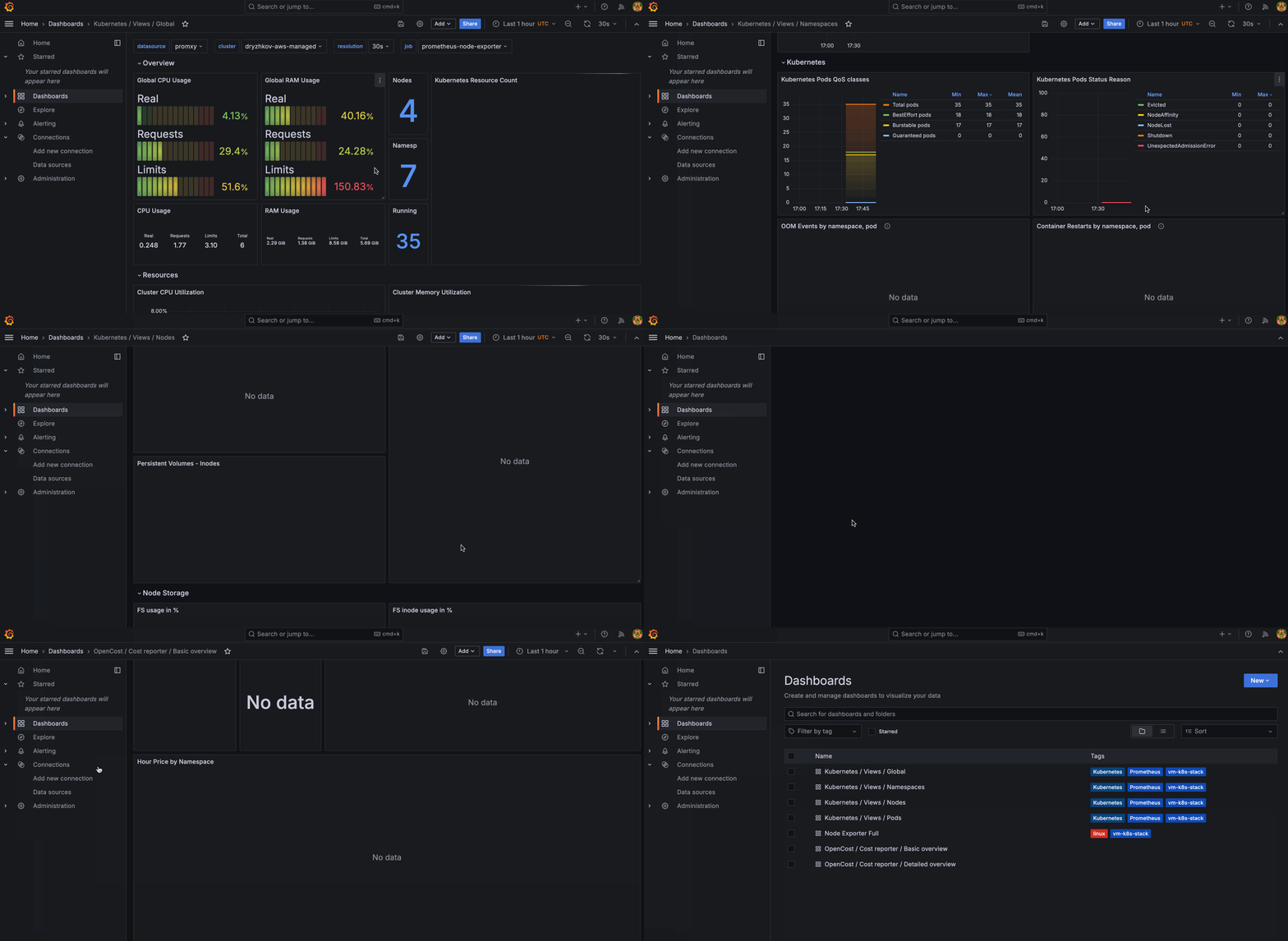
Cluster Overview#
From here you can get an overview of the cluster, including:
- Health metrics
- Resource utilization
- Performance trends
- Cost analysis
Logging Interface#
The logging interface will also be available, including:
- Real-time log streaming
- Full-text search
- Log aggregation
- Alert correlation
Traces#
You can view and analyze traces through Grafana Explore:
- Open Grafana in your browser.
- Navigate to "Explore" (compass icon in the left sidebar).
- Select the "Jaeger" type datasource from the dropdown at the top (not "VictoriaTraces").
- Use the query builder to search for traces by service name, operation, tags, or trace ID.
Dashboard Categories#
KOF ships with dashboards across:
- Infrastructure: Provides infrastructure-related metrics, such as kube clusters, nodes, API server, networking, storage, or GPU.
- Applications: Provides metrics for applications, such as VictoriaMetrics, VictoriaLogs, Jaeger and OpenCost.
- Service Mesh: Provides metrics for service mesh, such as Istio control-plane and traffic.
- Platform: Provides metrics for the platform itself, including KCM, Cluster API, and Sveltos.
Dashboard Lifecycle (GitOps Workflow)#
All dashboards are managed as code to keep environments consistent. To add or change a dashboard, follow these steps:
Add a new dashboard
- Create a YAML file under
charts/kof-dashboards/files/dashboards/with the new dashboard definition. - Commit and push the change to Git.
- Your CI/CD pipeline applies the Helm chart to the target cluster.
Update an existing dashboard
- Edit the corresponding YAML file.
- Commit and push changes.
- CI/CD will roll out the update automatically.
Delete a dashboard
- Remove the YAML file.
- Commit and push changes.
- CI/CD pipeline removes the dashboard from Grafana.
Warning
Avoid editing dashboards directly in the Grafana UI. Changes will be overwritten by the next Helm release.
Single Sign-On#
Port forwarding, as described above, is a quick solution.
Single Single-On provides better experience. If you want to enable it, please apply this advanced guide: Dex SSO for Grafana.
See also Multi-tenancy in KOF: Usage Examples for additional Dex SSO examples.
Uninstall Grafana#
If you have Grafana installed manually, and now you want to uninstall it, run:
kubectl delete --wait grafana -n kof grafana-vm