Cloud providers#
With MKE 4, you can deploy a cloud provider to integrate your MKE 4 cluster with cloud provider service APIs.
Info
AWS is currently the only managed cloud service provider add-on that MKE 4 supports. You can use a different cloud service provider; however, you must change the provider parameter under cloudProvider in the mke4.yaml configuration file to external prior to installing that provider:
cloudProvider:
  enabled: true
  provider: external
Prerequisites#
Refer to the documentation for your chosen cloud service provider to ascertain any proprietary requirements.
To use the MKE 4 managed AWS Cloud Provider, you must first ensure that your nodes have certain IAM policies. For detailed information, refer to the official AWS Cloud Provider documentation IAM Policies.
Configuration#
To enable cloud provider support, which is disabled by default, change the enabled parameter under cloudProvider in the mke4.yaml configuration file to true:
cloudProvider:
  enabled: true
  provider: aws
The cloudProvider configuration parameters are detailed in the following table:
| Field | Description | Default |
|---|---|---|
enabled |
Enables cloud provider flags on MKE 4 components. | false |
provider |
Either aws or external. If "external" is specified the user is responsible for installing their own cloud provider. |
"" `` |
Create an NLB with AWS Cloud Provider#
The example below illustrates how you can use cloud provider AWS to create a Network Load Balancer (NLB) in your MKE 4 cluster.
Once you have enabled the cloud provider through the mke4.yaml configuration file and have applied it, you can create an NLB as follows:
-
Create a sample NGINX deployment:
cat <<EOF | kubectl --kubeconfig ~/.mke/mke.kubeconf apply -f - apiVersion: apps/v1 kind: Deployment metadata: name: nginx-deployment spec: replicas: 3 selector: matchLabels: app: nginx template: metadata: labels: app: nginx spec: containers: - name: nginx-container image: nginx:latest ports: - containerPort: 80 EOF -
Create a service of type
LoadBalancer:cat <<EOF | kubectl --kubeconfig ~/.mke/mke.kubeconf apply -f - apiVersion: v1 kind: Service metadata: name: nginx-service annotations: service.beta.kubernetes.io/aws-load-balancer-type: nlb spec: selector: app: nginx ports: - protocol: TCP port: 80 targetPort: 80 type: LoadBalancer EOF -
Check the status of the service:
kubectl --kubeconfig ~/.mke/mke.kubeconf get serviceExample output:
NAME            TYPE           CLUSTER-IP     EXTERNAL-IP                                                                        PORT(S)        AGE
kubernetes      ClusterIP      10.96.0.1      <none>                                                                             443/TCP        14m
nginx-service   LoadBalancer   10.96.177.89   afdf81e0681274c52acbb7b45add87a1-637d0d850105ea92.elb.ca-central-1.amazonaws.com   80:32927/TCP   63s
The load balancer should now be visible in the AWS console.
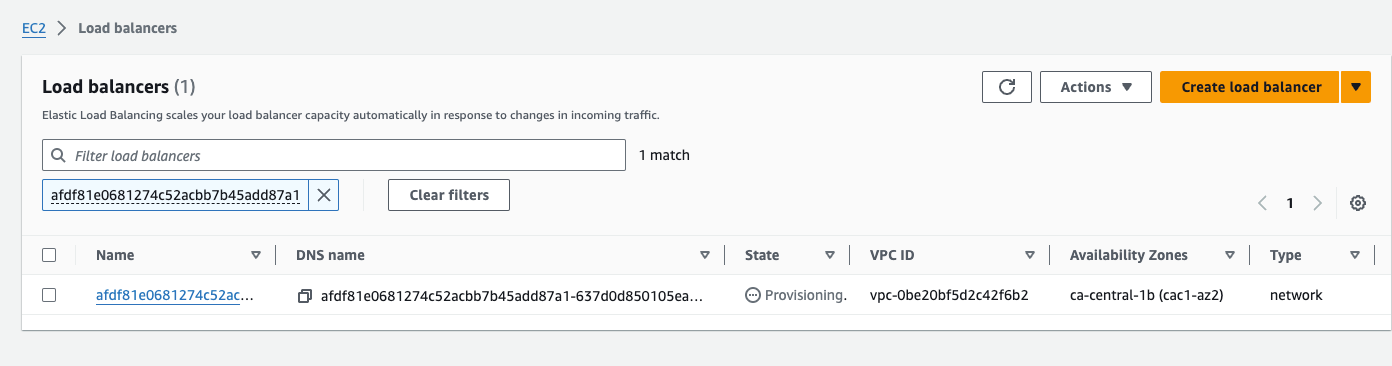
Once the load balancer finishes provisioning, you should be able to access NGINX through the external IP.